
What is the Codex Fluency Quiz report?
A check of how well your engineers know Codex as it is today. Everyone who uses it answers 68 short questions in 11 areas, one per screen, in about 23 minutes.
Each question has one right answer, so the level, from Beginner to Expert, comes from what people know, not from how they rate themselves. The report shows each team's levels, the weakest areas, the parts of the tool to train first, and where people's confidence and their results differ.
The short version
Engineers who use Codex at work answer 68 short questions in 11 areas, from models and steering to automation, parallel work and review. Every question has one right answer and "I’m not sure", so the level comes from what people know. It takes about 23 minutes.
The report shows levels by team, gaps by area, a list of where to train first, and how people work, such as whether they read the diff. It is not an OpenAI certification.
Eleven areas
The Claude Code and Codex Fluency Quizzes share the same 11 areas, in the same order, so their reports read side by side. Each area asks about the parts of the tool listed with it; the areas have 3 to 12 questions each.
Before the areas, About you asks three things: the team (optional, from a list set per round), "Where do you use Codex most?" and "How would you rate yourself with Codex?", from Beginner to Expert.
One right answer
Each screen shows one question with four answers, one of them right, and "I’m not sure". A right answer is 1 point; a wrong one, or "I’m not sure", is 0. On a keyboard, A to D pick an answer and N is "I’m not sure"; picking moves on to the next screen.
The real questions aren't published, so the quiz stays fair from one round to the next. Here is one of ours in the same shape, with its answer:
- The questions are about the tool as it is now: where a control lives, what a command does, which mode fits a task. Knowing the tool is the point, so each version carries the date it was checked.
- The right answers stay on the server. They never reach the survey, and people never see them, not even in their own result. Whoever can open the report sees them, ticked, on the Questions page.
- Every question was checked against OpenAI's Codex documentation and changelog in October 2026. We check them again every month, and when Codex moves a control or renames a command, the quiz gets a new version.
- No time limit, and people can go back and change an answer before they submit. It isn't supervised, so read it as a check, not an exam.
From right answers to a level
The score is right answers out of 68, and the level comes from it. The same cut-offs apply to everyone, whatever they rated themselves.
Move the score to see the level it gives:
Each area is scored on its own too, as right answers out of its questions. The habit questions never count.
Terminal or desktop app
Codex runs in the terminal and in a desktop app. 14 of the 68 questions ask about the desktop app only and 1 about the terminal only, so someone who never opens one of them will miss its questions.
The report's Where people use it sets each group's share of right answers on the desktop app questions against the terminal questions and the other 53. A low share on one part is about where people work, not how well they know the tool.
Confidence against results
One self-rating, for the whole tool, comes before the questions: "How would you rate yourself with Codex?", from Beginner to Expert. It isn't scored. It's set against the results, area by area, to show where confidence and results part ways:
The report's Confidence and score shows, for each self-rating, the levels those people reached, and which areas hold the blind spots and hidden strengths.
How people work
9 questions ask how people work, such as "Does your repository have an AGENTS.md?" and "Do you commit before a risky task?". They have no right answer and are never scored. The report shows how many people gave each answer, for everyone and for each team.
What people see
Whoever launches the quiz decides with one switch, Show people their own results, on by default. Off, people see a thank-you message only.
- Their own result, right after submitting: the level with its one-line summary, each area as right answers out of its questions, and where their self-rating and their score differ. With it a private link they can come back to; it keeps working after the quiz closes, and stops if results are switched off.
- What they never see: which questions they got wrong or the right answers, other people's results, or the company's numbers.
What the report shows
The report fills in from the first response. Its Insights tab has three pages: Overview, Questions and People, with a team filter and a filter for where people use the tool.
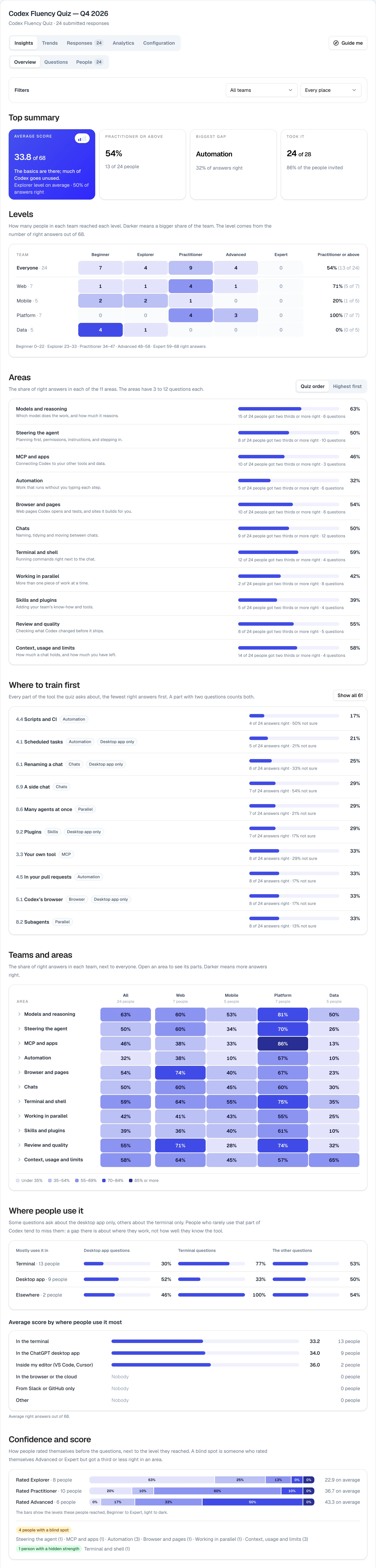
- Top summary: the average score out of 68, with its level as signal bars, one bar per level; how many people are at Practitioner or above; the biggest gap; and how many people took it.
- Overview: the levels of everyone and of each team; the areas, in the quiz's order or highest first; Where to train first, every part of the tool, the fewest right answers first; a heat map of teams by area; Where people use it; Confidence and score; and How people work.
- Questions: every question with the share that picked each answer, the right one ticked.
- People: everyone who answered, sorted by name, score, blind spots or when they answered. Open a person for the result they saw and their habit answers.
Trends compare rounds: the average score and the share at Practitioner or above, round by round. The team list is set per round on the report's Configuration tab.
Who sees what
- It can run anonymously. The launch window starts with a shared password and no names. You can ask for a name or an email instead, or have people sign in with Google or an emailed link, and then the report names people, with the People page and Responses open to whoever can open the report.
- Aggregates outside the report. The public link shows the Top summary and the Overview only, and the AI connection returns aggregates, never answers or names.
- For learning, not for decisions about people. As the quiz's own guidance says: "Results are for learning and planning, not for hiring or firing decisions on their own."
Limits
- It is not an OpenAI certification, and OpenAI hasn't made or endorsed it. It isn't supervised: it tells you where a team stands and where to start, not whether one person is qualified.
- Small groups swing. Results show from the first response, with no minimum group size, so a small team's numbers can point to one person.
- The questions date, on purpose. They ask about Codex as it is now and were checked against OpenAI's Codex documentation and changelog in October 2026. We check them every month and release a new version when the tool changes.