
What AI Skills Navigator actually teaches

You assigned the AI Skills Navigator Microsoft built for role-based upskilling, and now someone in leadership is asking whether people actually use what they learned on the job. That question is exactly where this catalog's reporting stops.
Rather than a flat course catalog you search yourself, the tool's homepage, retrieved in October 2026, presents curated, interest-based skilling playlists mapped to named roles, including Executive, Developer, IT professional, Data professional, Security professional, Sales, Marketing, Customer service, Faculty, Non-profit and Student. A sales manager and a security analyst start from different playlists, not the same generic list.
One access detail is worth checking before you roll this out broadly. Per a Microsoft Support article accessed in October 2026, Navigator content delivered through its Learning Agent is available only to Copilot and Copilot Chat users with a Microsoft 365 license, so anyone outside that license sits outside this experience.
Sources: AI Skills Navigator | Home, AI Skills Navigator (preview) in Learning Agent | Microsoft Support
How Applied Skills credentials move beyond course completion

Finishing a playlist only proves you watched the videos. Applied Skills credentials inside the tool work differently: per Microsoft Learn's credentials page, they're earned by completing a series of tasks through an interactive, lab-based assessment, not by clicking through slides.
Microsoft's own product team frames this shift as filling a specific gap practitioners kept raising. Priya Vaidyanathan, director of product management for Global Skilling at Microsoft, described it this way in a 2026 Inside Track post about the tool's design:
“The most consistent feedback from IT practitioners is that they need to move quickly from understanding AI to actually operating it.”
— Priya Vaidyanathan, Director of product management, Global Skilling, Microsoft · Source: Inside Track - Building AI skills for the future: How we’re reimagining learning with AI Skills Navigator
The April 2026 product update made the AI Transformation Leader and AI Business Professional certifications generally available inside the tool, with Microsoft describing them as a way to validate applied knowledge. That's Microsoft's own framing of what the exam checks, based on assessment performance rather than what the certified person does back at their desk the following week.
We're skeptical that a lab-graded credential says much about Monday-morning behavior: a controlled assessment rewards knowing the right steps, not reaching for AI unprompted when a real deadline hits.
The stakes around certification feel real to employees, even if they don't prove workplace change. In Pearson VUE's 2025 Value of IT Certification Candidate Report, 63% of professionals said they received or expected a job promotion after earning a certification. That's a self-reported expectation about IT certifications broadly, not a confirmed outcome tied to this tool.
Sources: Professional and Technical Credentials and Certifications | Microsoft Learn, What’s new in AI Skills Navigator: April 2026 | Microsoft Community Hub
What leaders can see today, and what they can't

As a Head of L&D, here's what the admin view actually gives you. Microsoft's April 2026 product update added real-time progress tracking so playlist owners and team leaders can watch how learners move through assigned playlists, including who started, who stalled and who passed a credential exam.
The AI Skills Navigator Microsoft ships here still reports completion, not conduct: it shows who moved through a playlist, not who opened Copilot the next time a report was due.
Reporting those completion numbers to your CEO as "AI adoption" is a mistake: a finished playlist proves someone sat through training, nothing about whether they use AI unprompted afterward.
| Signal | What it confirms | What it doesn't confirm |
|---|---|---|
| Playlist completion | Learner viewed the assigned content | Whether the skill gets used at work |
| Applied Skills credential | Learner completed lab-based tasks correctly | Whether the task repeats on the job |
| Certification exam pass | Learner passed a scored assessment | Day-to-day behavior after the exam |
Sources: What’s new in AI Skills Navigator: April 2026 | Microsoft Community Hub, Professional and Technical Credentials and Certifications | Microsoft Learn
Why finishing a playlist isn't the same as using AI at work
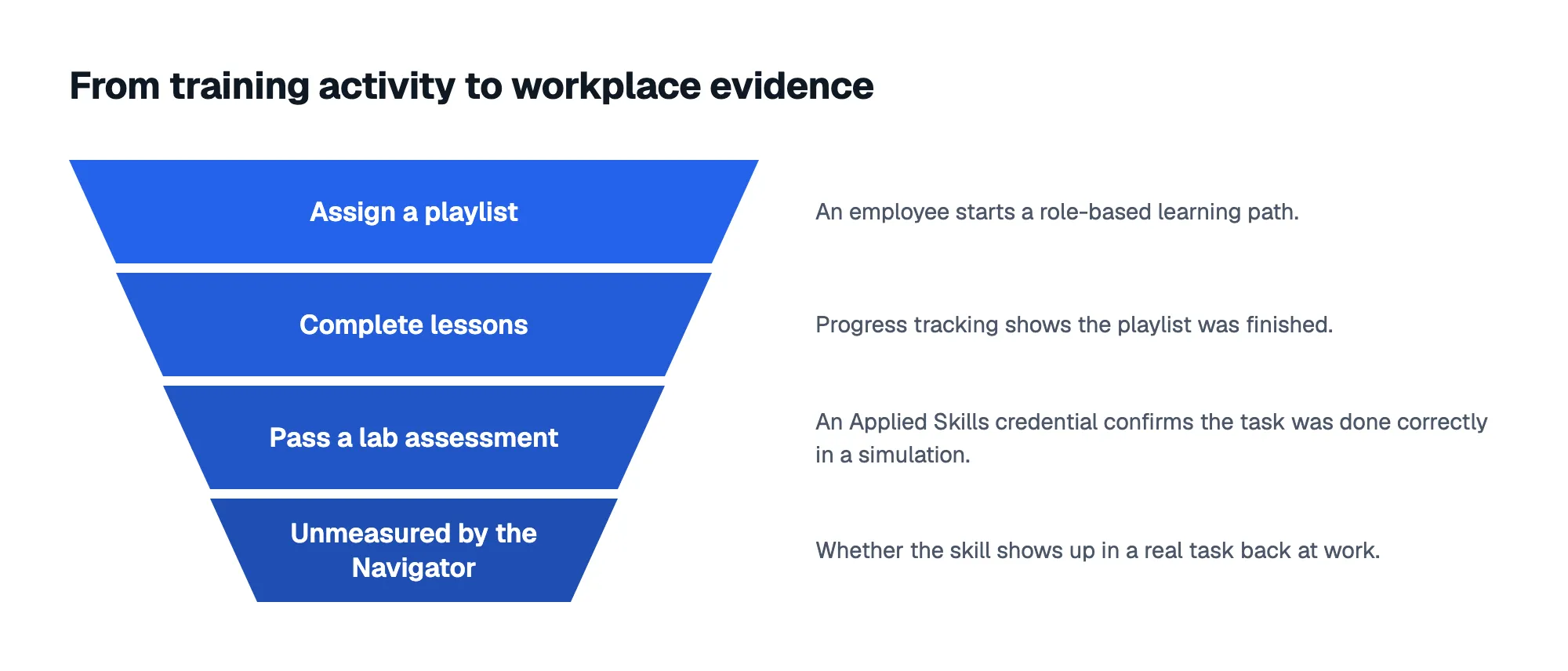
Here's the gap that matters most for your reporting. Nothing in Microsoft's materials for this tool claims to track whether a trained employee actually reaches for AI on a real task afterward; playlist completion, lab-based tasks and certification exams all measure learning activity in a controlled setting.
The broader certification research shows the same self-report ceiling. In Pearson VUE's 2025 Value of IT Certification Candidate Report, 76% of certified professionals said they felt more able to innovate and improve processes afterward. That's employees reporting a feeling of capability, not a measured change in what they actually produced.
Most L&D teams treat a credential count as a finish line. We think it's closer to a hypothesis that still needs testing against what people actually do once training ends.
Sources: Professional and Technical Credentials and Certifications | Microsoft Learn, What’s new in AI Skills Navigator: April 2026 | Microsoft Community Hub
Who should use the Navigator as it stands
As it stands, this tool fits two groups well: individual employees who want a guided, role-relevant path into AI rather than a confusing open catalog, and L&D teams that need a credible structure for assigning AI learning by role.
If you're building an AI skilling curriculum this quarter, we'd start here instead of mapping role-based courses from scratch; just don't ask it to double as your adoption dashboard.
Sources: AI Skills Navigator | Home, AI Skills Navigator (preview) in Learning Agent | Microsoft Support
Pair training data with a workplace survey
The AI Skills Navigator Microsoft offers today answers who trained and who passed, which is useful on its own. It was never built to answer who's using this at work, and closing that gap means asking employees directly a few weeks after training.
AI Adoption Score's predefined surveys ask employees how they actually use AI day to day, how confident they feel, and where they get stuck, with guidance on which survey to start with so you're not writing questions from scratch.
Its AI Adoption Barriers Survey, specifically, surfaces the real reasons a team isn't using AI more even after training, whether that's confidence, access or manager support, so you fix the actual blocker instead of assigning another playlist.
Training completion tells you what people sat through. A workplace survey tells you what they actually do with it, and that's the number worth bringing to your next leadership review.
Sources: Professional and Technical Credentials and Certifications | Microsoft Learn, What’s new in AI Skills Navigator: April 2026 | Microsoft Community Hub
Frequently asked questions
Does AI Skills Navigator require a specific Microsoft license?
Yes, for its Learning Agent content. Per a Microsoft Support article accessed in October 2026, that experience is available only to Copilot and Copilot Chat users holding a Microsoft 365 license, so confirm licensing coverage before assigning training across your whole workforce.
Can I track whether employees use AI skills after training?
Not through the Navigator's own reporting. If you want evidence of actual use, run a short workplace AI skills survey and ask employees directly what they've applied on real tasks, rather than relying on completion or credential counts alone.
How soon after training should I run a workplace AI skills survey?
As a general practice, we'd run it a few weeks after training wraps, once employees have had real tasks to apply the skill to, rather than immediately after the last lesson when memory of the course is still fresh.
Is a certification the same as proof someone applies a skill at work?
No. A certification only confirms you passed a lab-based or exam assessment at one point in time. A workplace survey can instead ask what tasks you've actually used AI for since training, how often, and what's kept you from using it more.
Sources: AI Skills Navigator (preview) in Learning Agent | Microsoft Support, Professional and Technical Credentials and Certifications | Microsoft Learn, What’s new in AI Skills Navigator: April 2026 | Microsoft Community Hub